
前言:由于一些项目都有在使用minio,所以自己也就随手写了一份工具,简单的封装了一个工具
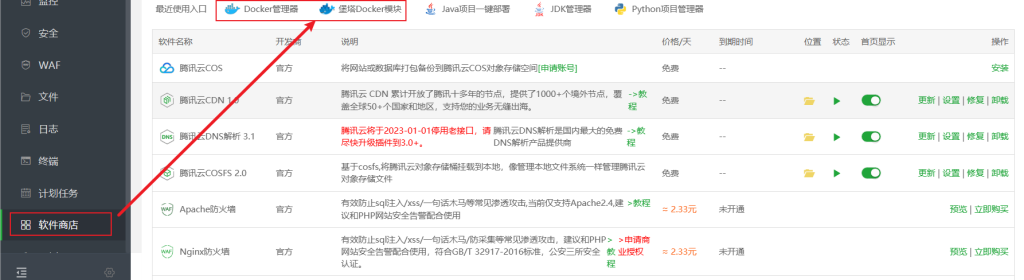
这里我使用的是腾讯云的宝塔面板,在docker中安装的minio,面板版本8.0.5,自带docker管理工具,在左侧软件商店中的顶部可以找到
这里提供一个docker的重装命令,之前docker由于装容器全局网络设置出现问题迫不得已从新安装了docker,如果是没有docker环境可以直接从安装新版本docker命令开始,如果docker环境没有问题,忽略此步骤。
卸载旧版本 Docker:
sudo yum remove docker docker-client docker-client-latest docker-common docker-latest docker-latest-logrotate docker-logrotate docker-engine删除 Docker 数据:(注:请谨慎使用删除命令!)
这将删除所有容器、镜像和容器卷
sudo rm -rf /var/lib/docker安装新版本 Docker:
sudo yum install -y yum-utils
sudo yum-config-manager --add-repo https://download.docker.com/linux/centos/docker-ce.repo
sudo yum install docker-ce docker-ce-cli containerd.io
启动 Docker 服务:
sudo systemctl start docker验证安装(验证 Docker 是否已正确安装且正在运行):
sudo docker --version
安装上docker环境后就可以在面板右侧docekr一栏中应用商店中搜索添加minio了
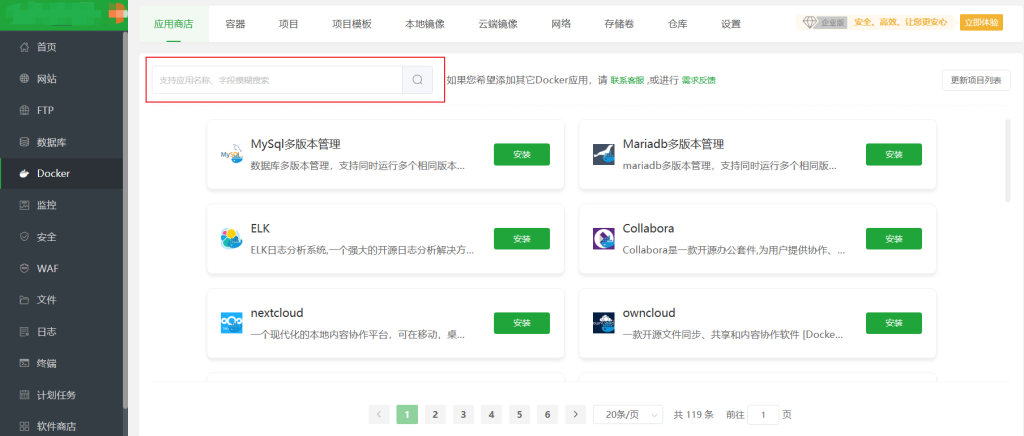
搜索并安装minio:
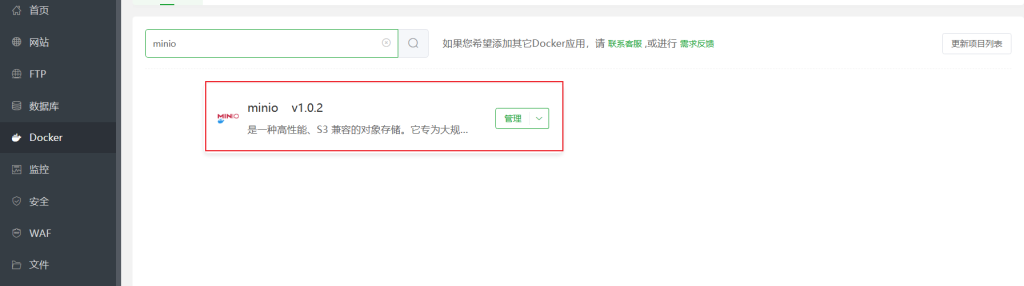
安装好且放行端口后登录minio对其进行配置:
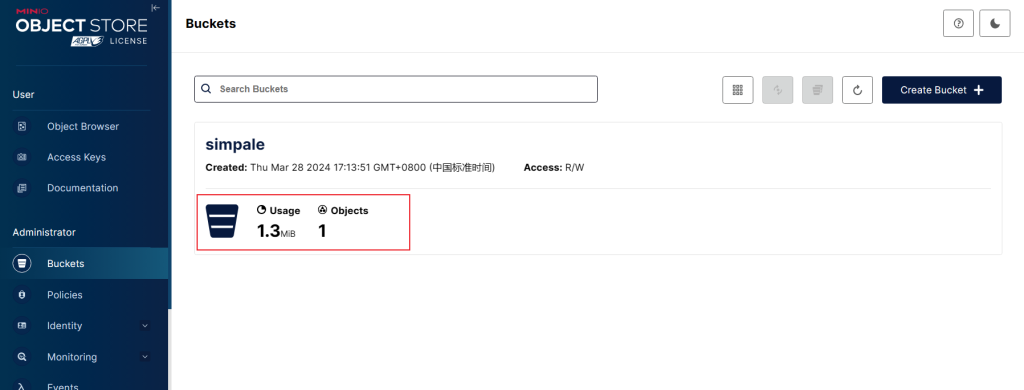
首先需要一个装数据的容器,到buckets这里创建一个桶
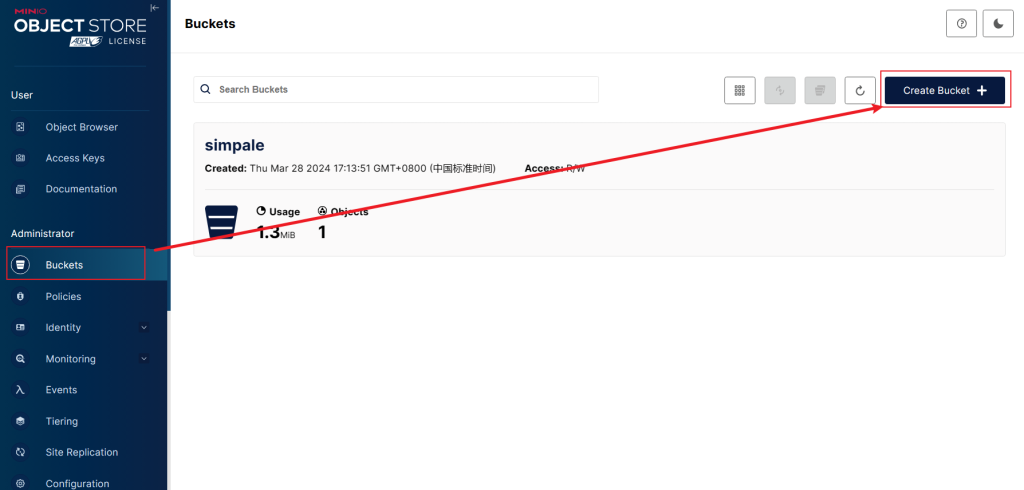
点击创建好的这个桶
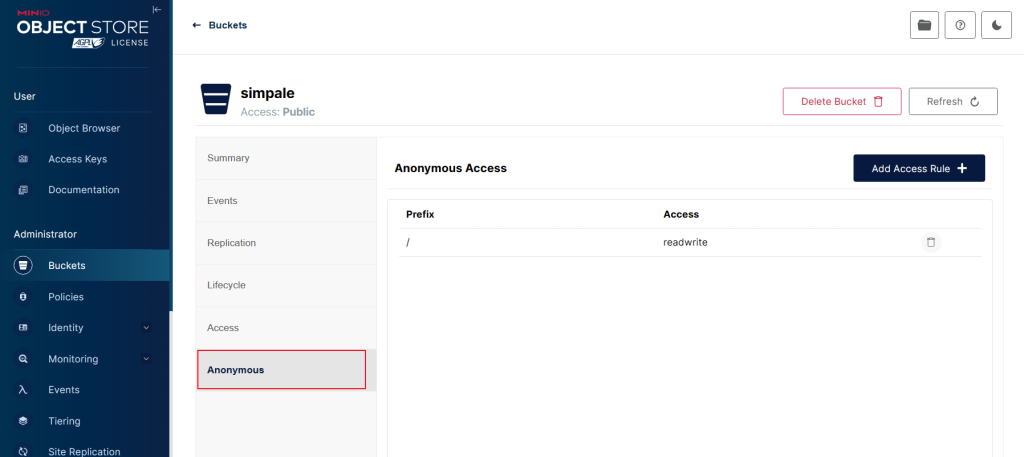
点击Anonymous添加规则
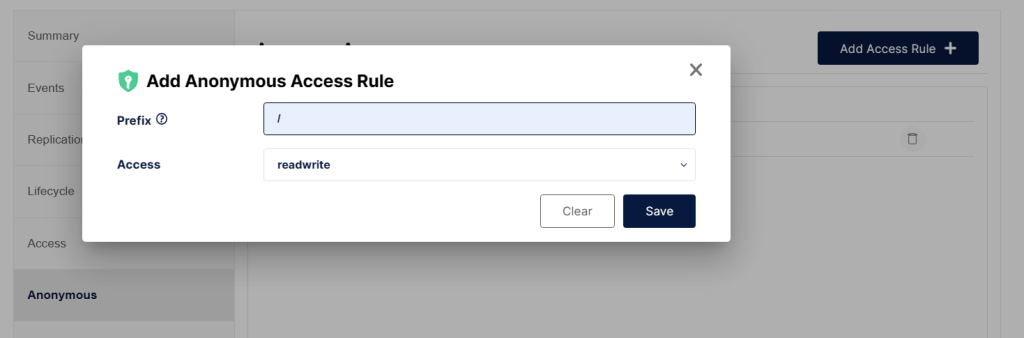
这里我设置的为读和写,路径为所有(用/表示)
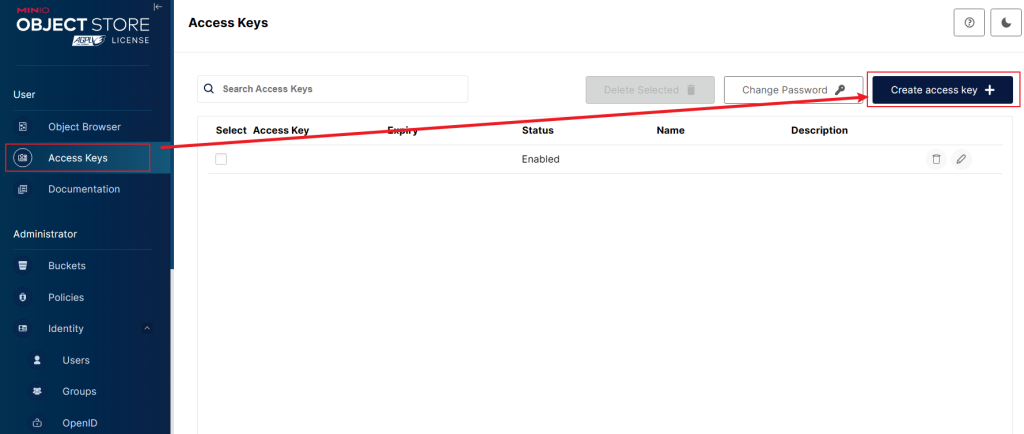
设置完桶后需要设置ak和sk,用于外部访问
在Access Keys一栏创建Access Key,创建后记好并保存key
然后是代码:
pom引出依赖:
        <dependency>
            <groupId>io.minio</groupId>
            <artifactId>minio</artifactId>
            <version>7.0.2</version>
        </dependency>
yml文件:
minio:顶头写,注意冒号后有一个空格,ip和端口号替换成自己的,ak和sk使用刚才创建的ak和sk,bucketName名称也填写到这里
minio:
  ip: http://127.0.0.1
  port: 9000
  accessKey: yourAccessKey
  secretKey: yourSecretKey
  bucketName: yourBucketName
minioTemplate:
上传的方法直接获取了前端传递的文件名,也可以通过注释掉的方式生成一个文件名
package com.springbootdemo.cn.demo.util;
import io.minio.*;
import io.minio.errors.*;
import org.springframework.beans.factory.annotation.Value;
import org.springframework.stereotype.Component;
import org.springframework.web.multipart.MultipartFile;
import java.io.IOException;
import java.io.InputStream;
import java.security.InvalidKeyException;
import java.security.NoSuchAlgorithmException;


/**
 * @author Administrator
 */
@Component
public class MinioTemplate {


  @Value("${minio.ip}")
  private String ipaddrs;

  @Value("${minio.port}")
  private String port;

  @Value("${minio.accessKey}")
  private String accessKey;

  @Value("${minio.secretKey}")
  private String secretKey;

  @Value("${minio.bucketName}")
  private String bucketName;


  private MinioClient getMinioClient() throws IOException, NoSuchAlgorithmException, InvalidKeyException{

    MinioClient minioClient =null;
    try {
      // Create a minioClient with the MinIO server playground, its access key and secret key.
      minioClient = new MinioClient(ipaddrs+":"+port,accessKey, secretKey);
      // Make 'asiatrip' bucket if not exist.
      boolean found =
              minioClient.bucketExists(bucketName);
      if (!found) {
        // Make a new bucket called 'asiatrip'.
        minioClient.makeBucket(bucketName);
      } else {
        System.out.println("The data has been success stored bucket "+bucketName);
      }
    } catch (MinioException e) {
      System.out.println("Error occurred: " + e);
      System.out.println("HTTP trace: " + e.fillInStackTrace());
    }
    return minioClient;
  }

  public String uploadFiles(String uploadFileName, MultipartFile file) throws NoSuchAlgorithmException, InvalidKeyException, IOException, InsufficientDataException, InternalException, InvalidResponseException, XmlParserException, ErrorResponseException, InvalidBucketNameException {
    MinioClient minioClient = getMinioClient();

    String fileName = file.getOriginalFilename();
//    String newName ="demo/"+ UUID.randomUUID().toString().replaceAll("-", "")
//            + fileName.substring(fileName.lastIndexOf("."));
    //新的名称,demo是bucket下的文件夹

    //获取file的inputStream
    InputStream inputStream = file.getInputStream();
    //上传
    minioClient.putObject(bucketName, uploadFileName, inputStream, new PutObjectOptions(inputStream.available(), -1));
    inputStream.close();
    //文件访问路径
      return minioClient.getObjectUrl(bucketName, uploadFileName);
  }


  /**
   * 列出一个桶中的所有文件和目录
   */
  public Boolean deleteFiles(String fileName) throws Exception {
    MinioClient minioClient = getMinioClient();
    minioClient.removeObject(bucketName,fileName);
    return true;
  }


}
剩下的部分就是编写接口,前端调用了(这里列举上传文件)
Controller
    @ApiOperation("minio文件上传")
    @Operation(summary = "minio文件上传", description = "minio文件上传")
    @PostMapping(value = "/fileUpLoad", consumes = {MediaType.MULTIPART_FORM_DATA_VALUE})
    public String fileUpLoad(@RequestParam("file") MultipartFile file, String fileName){
        return minioService.fileUpLoad(file,fileName);
    }
Service
    /**
     * 通过minio上传文件
     * @param file 文件
     * @param fileName 文件名称
     * @return 返回文件上传路径
     */
    String fileUpLoad(MultipartFile file, String fileName);
Impl
    @Override
    public String fileUpLoad(MultipartFile file, String fileName) {
        String files = null;
        try {
            files = minioTemplate.uploadFiles(fileName, file);
        } catch (Exception e) {
            log.error(e.getLocalizedMessage(), "上传文件出错!");
        }
        return files;
    }
代码比较简单,搭建服务成本也比较底,之前看到有同学买的oss遭到攻击一晚损失一个多w还是挺震惊的。项目如果不大其实minio也完全够用。